As you have all too well noticed, the phone has become indispensable, even on the boat, during charter week. Phones and tablets have evolved enough to become capable of running increasingly complex, more or less useful applications, which brings us to the topic at hand: mobile applications used on charter weeks. No current app takes on the responsibility of being the sole source of information; maps, analogue instruments and visual observation remain the most reliable method of navigation. Even if you participate in Capetan Hands on Practice or Hands On Practice AdvancedWe always devote good hours to the presentation of the digital navigation applications, as they represent an additional information and details that help us to make a passage planning as safe, accurate and appropriate to the local weather conditions. Whether you are skippering a boat taken through capetancharter.com or are you on a private week sailarmada.comIf you are interested in sailing and want to find out more details about where you are, where you are going and when you will arrive, I am sure one of the options below will help you.

Navionics (navionics.com) possibly the most used mobile/tablet app at the moment, with an intuitive interface and rich enough detail. It displays maps very quickly even on a phone or tablet with average technical specifications, has distance measurement and bearing display, overlay with satellite imagery (very useful for reconnaissance in unknown areas), easily synchronizes with current generation charterplotters and even connects with AIS devices (https://www.allaboutais.com/index.php/en/) installed on the boat. Automatic routing can be considered basic, but sufficient for coastal passages.

C-MAP (c-map.com) is a very affordable option for a navigation program, with many free features included. As long as you have an internet connection, you have high-fidelity maps wherever you are and can overlay AIS or GRIB (wind) with ease. For the rest of the features there is, of course, a PRO version, with an annual subscription that allows you to do performance routing including weather, download maps and use them without an internet connection, and many other options that may not be so useful in a simple week's charter.

Savvy Navvy (savvy-navvy.com) is the newest sailing app on the market today: ultra-sophisticated, with a powerful routing algorithm that takes into account currents and tides, ultra-intuitive. Unfortunately, at the moment it doesn't have the AIS overlay option and it doesn't know how to take into account boat poles, but surely these are features that won't be long in coming in future updates. The app comes with a 14-day free trial, after which you can opt for one of the subscriptions that best meets your requirements.

Seapilot (seapilot.com) is an established application, with useful functions in the free version: overlay for AIS and GRIB. A not exactly intuitive design comes with useful functions such as MOB and the ability to connect to the NMEA protocol of the boat you are on. Buying maps is customizable, spending money strictly on maps of your area of interest...
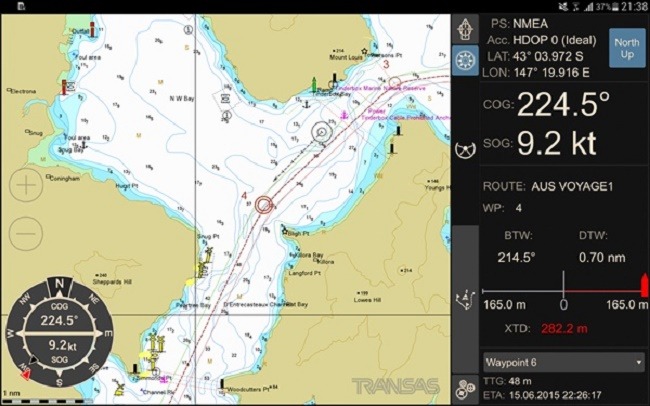
iSailor (isailor.us) a versatile application, also available on smartwatches. It has interfacing capability with the boat's NMEA devices, AIS overlay and powerful configuration of the amount of information present on the chart. Includes anchor alarm, waypoint proximity, lost GPS signal or low battery applications. For routing, it even has alarms on obstacles at a lower zoom - forcing the user to zoom in to see the necessary detail. Of all the apps on display, unfortunately this one has the most difficult routing tools, being a bit counterintuitive to place waypoints and create routes.
Whichever app you choose, it's good to keep in mind:
- updating the application and the maps you are going to use
- The ZOOM of the maps you're working on - don't suffer like the Vestas team
- never rely solely on the application's routing system and understand that the predicted ETA is strictly informative
- be careful when using the AIS overlay function: not all vessels, especially in busy charter areas, have AIS transmitters, so this system does not take the place of the classic lookout system
- Alarms you receive from apps should be checked and not always taken for granted. A visual check and with the help of analogue instruments are indispensable.
Now it's up to each person to decide which application is more suitable. I'm sure that in time there will be more powerful, more complex and more intuitive ones, but until then I'm still firmly convinced that without a classic navigation knowledge base (map/ compass/ compass/ sextant) your safety level cannot be at the highest level. I invite you to one of our practice courses HOP / HOPA or MilesBuilding to deepen both methods.